Last updated on: May 15, 2026
Table of Contents
Architectural drawings are detailed, two-dimensional, or three-dimensional renderings that illustrate a building’s design, structural elements, and materials. Used by architects and contractors, these documents guide construction, ensure regulatory compliance, and communicate the aesthetic vision. They typically include floor plans, elevations, sections, and site plans.
These drawings show how a building is designed, organized, measured, and constructed. They help architects explain their ideas, contractors understand what needs to be built, engineers coordinate their systems, and owners visualize the final outcome.
If you are new to construction, design, or architecture, architectural drawings can look complicated at first. There are lines, symbols, dimensions, notes, scales, sections, elevations, and many different sheets. But once you understand the purpose of each drawing, they become much easier to read.
In this guide, we’ll break down what architectural drawings are, why they matter, the main types used in building projects, common symbols, drawing scales, and how to read them step by step.
What Are Architectural Drawings?
Architectural drawings are technical drawings that show the design, layout, dimensions, and construction details of a building or space. They act as a visual instruction set for everyone involved in a project, including architects, engineers, contractors, builders, consultants, and clients.
A good architectural drawing does more than show what a building looks like. It explains how spaces connect, where walls and openings are placed, how tall different parts of the building are, what materials may be used, and how important details should be built.
In simple terms, architectural drawings answer questions like:
- What does the building look like?
- How is the space arranged?
- What are the room sizes?
- Where are doors, windows, walls, stairs, and openings located?
- How high are the floors, ceilings, and roof elements?
- How should key construction details be understood?
For a homeowner, architectural drawings help turn an idea into something visible. For a contractor, they provide the instructions needed to build accurately. For a city or approval authority, they help review whether the proposed design meets required standards.
Why Are Architectural Drawings Important?
Architectural drawings are important because they reduce confusion. A building project involves many people, and each person needs to understand the same design in the same way. Without proper drawings, even simple decisions can become expensive mistakes.
Here’s why architectural drawings matter.
- They Communicate The Design ClearlyVerbal explanations are not enough for construction. A drawing gives everyone a shared reference. It shows the design visually, which makes it easier to review, discuss, revise, and approve.
- They Support Permits and ApprovalsMost building projects need drawings for planning approval, building permits, or code review. Authorities use architectural drawings to check basic design information, safety requirements, site layout, access, dimensions, and other project details.
Approval authorities often review architectural and engineering drawings as part of the construction documents required for plan review, especially for building size, occupancy, site layout, sections, structural information, and code-related requirements. - They Help Contractors Build AccuratelyContractors rely on drawings to understand what needs to be built. Floor plans, elevations, sections, and details guide layout, measurements, openings, levels, materials, and installation requirements.
- They Help Estimate CostDrawings help quantity surveyors, estimators, and contractors understand the scope of work. The more complete the drawings are, the easier it is to estimate materials, labor, and construction cost.
- They Reduce ReworkWhen drawings are clear, coordinated, and accurate, there is less room for misinterpretation. That means fewer site errors, fewer delays, and fewer costly revisions during construction.
Architectural drawings are not just design visuals. They are communication tools, approval documents, coordination references, and construction guides.
How Are Architectural Drawings Created?
Architectural drawings are usually developed in stages. They do not start as fully detailed construction documents. The process begins with basic project information and design intent, then gradually turns into accurate drawings that can be used for approvals, coordination, estimating, or construction.
The base for architectural drawings often comes from:
- Client requirements
- Site measurements
- Existing building drawings
- Survey information
- Design sketches
- Space planning layouts
- Code and zoning requirements
- Architect’s design intent
- CAD files, PDFs, markups, or BIM models
Once this information is collected, the design team starts shaping it into a clear drawing set.
First, rough sketches or schematic layouts are prepared to show the basic arrangement of spaces. These early drawings help define room locations, circulation, building form, and overall design direction.
After the concept is approved, the drawings are developed in more detail. Floor plans become more accurate, elevations and sections are added, wall locations are refined, and doors, windows, stairs, levels, dimensions, notes, and symbols are included.
At this stage, CAD drafters or BIM modelers may convert the design into organized CAD drawings or Revit-based documentation. The drawings are then checked for consistency, scale, readability, and coordination with other project information.
Once reviewed, the architectural drawings are ready to move into the next process, such as permit submission, design coordination, quantity takeoff, BIM modeling, construction documentation, or contractor review.
In simple terms, the flow looks like this:
Project inputs → sketches/layouts → developed plans → elevations and sections → details, notes, and dimensions → reviewed architectural drawing set
The goal is to turn design intent into a clear, accurate, and usable drawing set that the next project team can confidently work from.
What Do Architectural Drawings Include?
The contents of an architectural drawing set depend on the project type, size, design stage, and local requirements. A small residential project may need a limited drawing set, while a commercial building may require dozens or even hundreds of sheets.
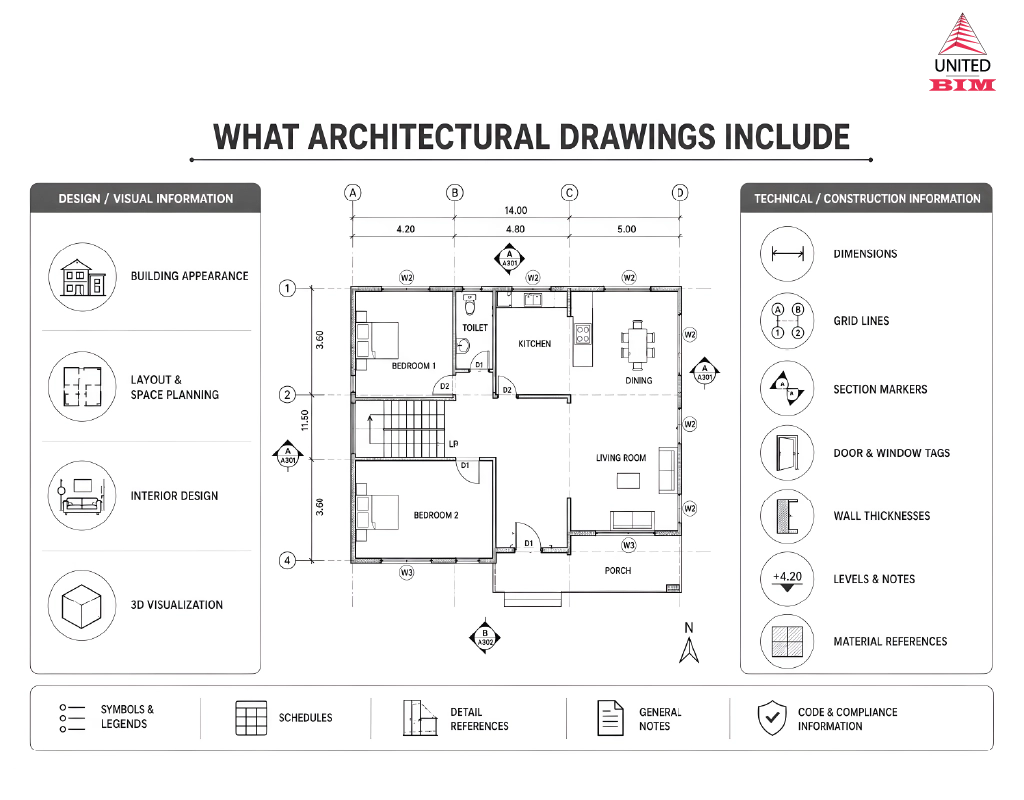
A typical architectural drawing set may include:
- Cover sheet
- General notes
- Site plan
- Floor plans
- Roof plan
- Reflected ceiling plans
- Elevations
- Cross sections
- Legends and symbols
- Wall sections
- Enlarged plans
- Isometric and axonometric projections
- Interior elevations
- Door and window schedules
- Finish schedules
- Detail drawings
- Code-related information
- Accessibility notes
Not every project needs all of these. But most architectural drawing sets include at least floor plans, elevations, sections, dimensions, notes, and basic construction details.
Many project teams also follow recognized drawing organization standards, such as the United States National CAD Standard, to keep CAD layers, sheets, symbols, and documentation consistent across project teams.
For project teams that need help preparing these deliverables, United-BIM’s architectural drafting services support accurate CAD and Revit drawing creation from design inputs, sketches, PDFs, and markups.
Common Architectural Drawing Symbols
Architectural drawing symbols are simplified graphic marks used to represent building elements. Instead of drawing every object realistically, architects use standard symbols to make drawings faster to read and easier to understand.
Common architectural drawing symbols include:
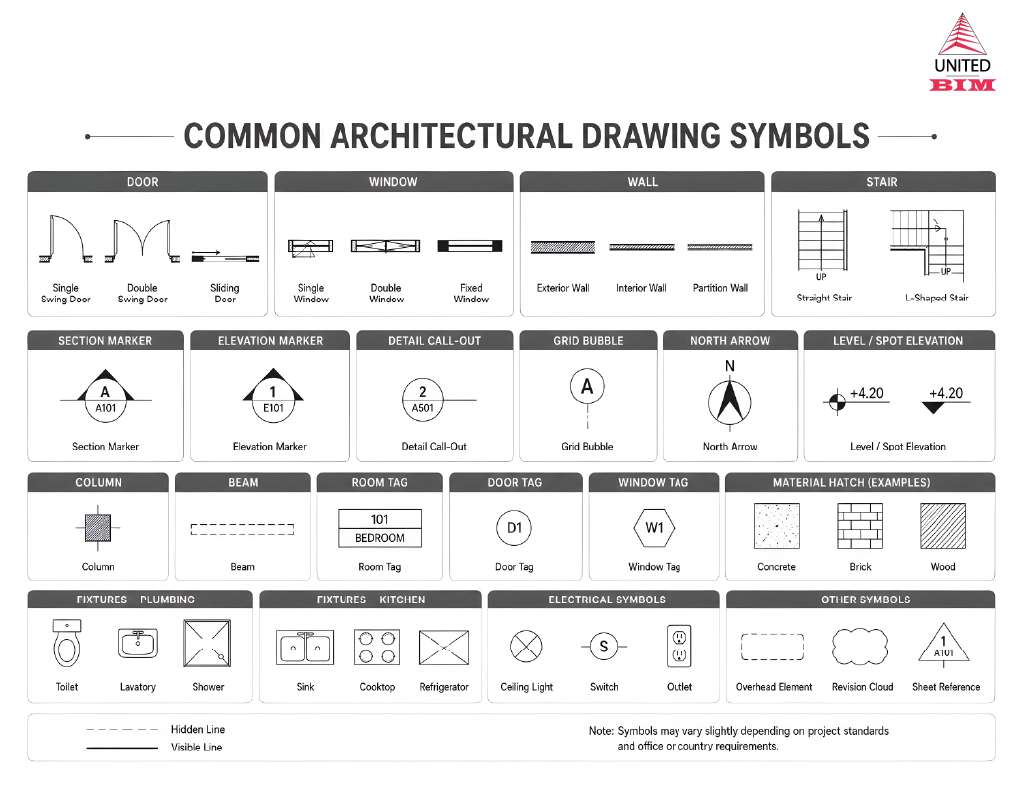
- Doors
- Windows
- Stairs
- Walls
- Columns
- Elevation markers
- Section markers
- Grid lines
- North arrows
- Room tags
- Dimension lines
- Level markers
- Material symbols
- Plumbing fixtures
- Electrical fixtures
For example, a door is usually shown with a straight line and an arc that indicates the direction of the door swing. Stairs are shown with parallel lines and arrows to indicate the direction of travel. Section markers show where the building is being cut for a section drawing.
Most drawing sets include a legend or symbol list. If you are reviewing architectural drawings for the first time, the legend is one of the best places to start.
Do not assume every symbol means the same thing in every drawing set. Many symbols are common, but offices and projects may use slightly different graphic standards. Always check the project legend before interpreting symbols.
Understanding Architectural Drawing Scale
Architectural drawings are usually drawn to scale. This means the drawing is smaller than the real building, but the proportions are accurate.
Scale helps large buildings fit on paper or screens while still allowing measurements to be understood. For example, a wall that is 20 feet long in real life may be represented by a much smaller line on the drawing, depending on the selected scale.
Common architectural drawing scales may vary by country and project standards, but they often include scales for:
- Site plans
- Floor plans
- Elevations
- Sections
- Enlarged plans
- Interior details
- Construction details
Larger-scale drawings show more detail. Smaller-scale drawings show a wider area with less detail.
For example:
- A site plan may use a smaller scale because it needs to show the whole property.
- A floor plan uses a scale that shows rooms and dimensions clearly.
- A wall detail uses a larger scale because it needs to show materials, layers, and connections.
How to Read Architectural Drawings Step by Step
Reading architectural drawings becomes easier when you follow a sequence. Do not jump straight into the details. Start with the basic project information, then move from general drawings to specific details.
Here is a simple step-by-step approach.
Reading architectural drawings becomes easier when you follow the right order. Instead of jumping into details first, start with the basic project information and move from general drawings to specific notes and dimensions.
Start with the title block
Check the project name, sheet title, sheet number, scale, issue date, revision number, and consultant details. This helps confirm you are reviewing the right drawing and the latest version.
Review the drawing index
The drawing index shows all sheets included in the set. It helps you understand how architectural, structural, MEP, and other drawings are organized.
Look at the site plan
The site plan shows the building’s location, orientation, access points, property boundaries, and surrounding site features.
Read the floor plans
Floor plans explain the room layout, wall locations, doors, windows, dimensions, stairs, circulation, and key references to other drawings.
Check elevations and sections
Elevations show the building’s appearance, height, openings, materials, and exterior details. Sections show vertical relationships such as ceiling heights, floor levels, stairs, roof forms, and wall assemblies.
Review symbols, notes, and legends
Symbols and notes explain important drawing information that may not be obvious visually. Always check the legend before interpreting symbols.
Check dimensions carefully
Use written dimensions instead of guessing from the drawing. Dimensions confirm room sizes, wall locations, openings, levels, and clearances.
In short, read architectural drawings from broad to detailed:
title block → index → site plan → floor plans → elevations and sections → notes, symbols, and dimensions.
Architectural Drawings vs. Blueprints
People often use the words architectural drawings and blueprints as if they mean the same thing. In everyday conversation, that is understandable. But technically, they are not exactly the same.
A blueprint originally referred to a specific reproduction process that created white lines on a blue background. Older construction drawings were often copied using this method, which is why many people still call building drawings “blueprints.”
Today, most architectural drawings are created digitally using CAD or BIM software and shared as PDFs, printed sheets, or digital models. For projects that require model-based documentation, United-BIM’s architectural BIM services help develop architectural Revit models and coordinated drawing sets for design and construction workflows.
In short:
- Blueprints are an older term often used casually.
- Architectural drawings are the actual design and construction drawings used in modern projects.
Architectural Drawings vs. Construction Drawings
Architectural drawings and construction drawings are closely related, but they are not always the same thing.
Architectural drawings and construction drawings are closely related, but they are not always the same thing.
A construction drawing set may include architectural drawings, structural drawings, mechanical drawings, electrical drawings, plumbing drawings, fire protection drawings, and other consultant drawings.
Think of it this way:
- Architectural drawings explain the architectural design.
- Construction drawings explain how the full project should be built across multiple disciplines.
For small projects, the difference may feel minor. For larger projects, construction drawings are usually much more detailed and coordinated.
Final Thoughts
Architectural drawings are the visual language of building design and construction. They show how a project is planned, how spaces are arranged, how the building looks, and how important parts should be built.
For beginners, the best way to understand architectural drawings is to read them in order. Start with the title block and site plan. Then study the floor plans, elevations, sections, details, symbols, and notes. Over time, the drawings begin to feel less like a technical puzzle and more like a clear story of how the building comes together.
Whether you are planning a home renovation, reviewing a commercial project, studying architecture, or coordinating construction documents, understanding architectural drawings will help you make better decisions and communicate more clearly with your project team.
Architectural drawings are technical drawings that show the design, layout, dimensions, appearance, and construction information of a building or space. They help architects, contractors, engineers, clients, and approval authorities understand the project clearly.
The main types of architectural drawings include site plans, floor plans, roof plans, elevation drawings, section drawings, reflected ceiling plans, detail drawings, and schedules.
The purpose of architectural drawings is to communicate design intent, support approvals, guide construction, coordinate project teams, and reduce errors during the building process.
A floor plan shows the building layout from above. An elevation shows one side of the building as a flat vertical view. Floor plans explain space arrangement, while elevations explain height, appearance, openings, and exterior or interior surfaces.
A section drawing shows a vertical cut through a building. It helps explain floor levels, ceiling heights, wall assemblies, stairs, roofs, and other vertical relationships that are not clear in a floor plan.
Architectural drawing symbols are simplified marks used to represent building elements such as doors, windows, stairs, walls, section markers, elevation markers, fixtures, materials, and dimensions.
Start with the title block and drawing index. Then review the site plan, floor plans, elevations, sections, details, symbols, notes, and dimensions. Always check the scale, revision date, and references between sheets.
Not exactly. Blueprint is an older term that originally referred to a specific drawing reproduction method. Today, people often use “blueprints” casually, but architectural drawings is the more accurate term for modern building design documents.
Architectural drawings are typically prepared by architects, architectural designers, drafters, BIM modelers, or design documentation teams. Depending on the project, drawings may also be coordinated with structural, mechanical, electrical, and plumbing consultants.
Yes, architectural drawings usually include dimensions. Dimensions show room sizes, wall locations, openings, levels, clearances, and other important measurements required for design review and construction.
Architectural drawings focus on aesthetics, layout, and functionality. Structural drawings, created by engineers, focus on the "bones" of the building—load-bearing walls, foundations, and materials needed to keep the building standing.
Architectural drawings are commonly created using CAD and BIM software. Popular tools include AutoCAD for 2D drafting, Revit for BIM-based architectural drawings and documentation, ArchiCAD for model-based design, SketchUp for early design visualization, and Rhino for complex forms. For professional construction documentation, AutoCAD and Revit are among the most widely used tools.
About the Author

Coordination Manager / VDC Manager at United BIM
With over 10 years of experience in the AEC industry, Akash Patel is a seasoned Coordination Manager and VDC Manager at United BIM. His expertise lies in managing complex MEP-FP coordination projects and leveraging cutting-edge BIM technology to ensure seamless collaboration and precision. Akash is dedicated to delivering high-quality, detailed models that meet the demands of modern construction. He is passionate about optimizing workflows and driving innovation within the BIM field.