Last updated on: March 17, 2026
Table of Contents
If you manufacture AV equipment, your products rarely get selected at the moment of installation.
In most projects, the decision happens much earlier.
Architects, AV consultants, electrical engineers, and technology planners evaluate equipment while the building itself is still being designed. They are planning conference rooms, auditoriums, lecture halls, stadium media systems, and collaboration spaces long before construction begins.
This is where product selection often starts.
And today, these professionals are not working only with drawings or specification sheets. They are working inside BIM models (digital 3D models used to design and coordinate buildings).
Understanding how these design teams work can reveal something important for AV manufacturers:
your products are increasingly evaluated inside digital building models.
Who Actually Specifies AV Equipment in Projects?
Before talking about Revit or BIM, it helps to understand who your customers really are during the design stage.
AV equipment is typically evaluated by professionals such as:
- AV consultants and technology planners
- Architects designing the building layout
- Electrical engineers planning infrastructure
- System integrators involved in design coordination
- Project engineers reviewing system requirements
These professionals are responsible for determining how technology fits into the building environment.
They must consider questions like:
- Where should speakers be placed in the ceiling grid?
- How will projectors be mounted and aligned?
- How will microphones integrate with conference tables?
- Where will AV racks be located and how will cables be routed?
To answer these questions, they increasingly rely on BIM models that allow them to coordinate building systems in three dimensions.
Make Your Products Easier to Specify
Revit-ready product models allow design teams to evaluate and coordinate AV equipment within building designs more efficiently.
Most AV product decisions begin during the design stage, when consultants evaluate how equipment fits into the building layout.
How AV Systems Are Designed in Modern Projects
When designers begin planning a building, they often develop a coordinated digital model using tools such as Revit (a widely used BIM software for building design).
Inside this model, different disciplines contribute their systems:
- Architects define spaces and layouts
- Engineers plan electrical and infrastructure systems
- Consultants coordinate specialized technologies
These professionals are responsible for determining how technology fits into the building environment.
AV consultants also work within this environment.
When planning systems for spaces such as conference rooms, theatres, classrooms, and control centers, they need to place equipment within the model to understand how everything fits together.
For example, they may position:
- Ceiling speakers
- Wall-mounted displays
- Conferencing microphones
- Control panels
- Projectors
- AV equipment racks
Placing these elements in the model helps the project team understand spatial relationships and installation requirements before construction begins.
The Challenge Designers Often Face
Here is where an important gap appears.
Most AV manufacturers provide excellent documentation for their products, including:
- Product specification sheets
- Installation guides
- CAD drawings
These resources are essential for understanding the product. However, they do not always integrate directly into BIM-based design workflows.
When designers are working in a Revit model, they typically need digital objects representing the equipment they are evaluating.
If manufacturer models are not available, designers often create temporary placeholders that represent generic equipment rather than specific products.
While this allows the design process to continue, it means the actual product may not appear clearly in the design environment.
Design teams often prioritize products that are easy to integrate into their models because they help move the project forward faster.
Make Your AV Products BIM-Ready
Help architects and AV consultants integrate your equipment directly into building models with well-structured Revit families.
What Designers Actually Want From Manufacturers
From the perspective of architects and consultants, the ideal manufacturer product includes more than just documentation.
They look for digital content that helps them quickly answer practical design questions such as:
- How large is the equipment footprint?
- Where will it be mounted?
- How much clearance does it require?
- How does it interact with ceilings, lighting, or walls?
Instead of interpreting these details from drawings or manuals, designers prefer to place the product directly into the building model.
This allows them to immediately evaluate how the equipment fits within the space.
Where Revit Families Fit Into the Picture
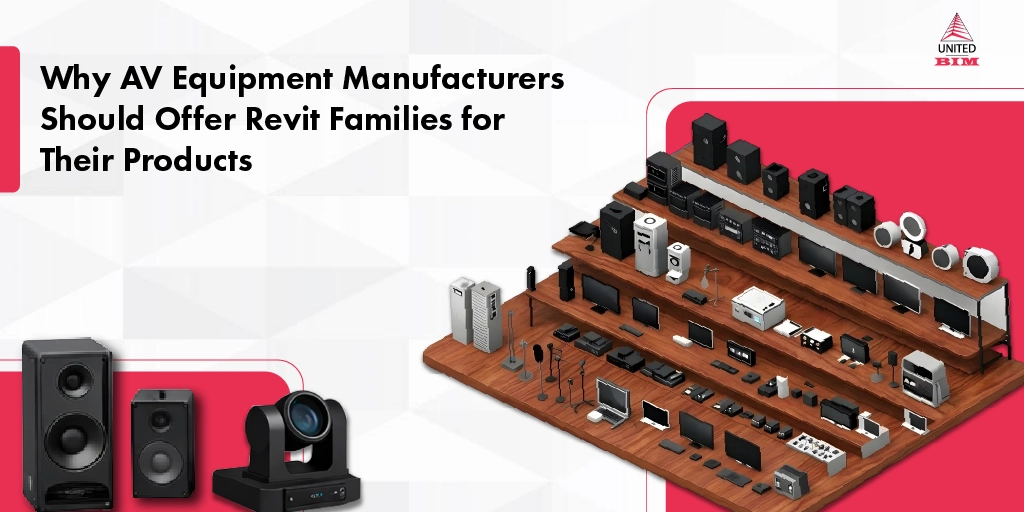
A Revit family is essentially a digital representation of a real product that can be placed into a Revit model.
For AV manufacturers, this could represent equipment such as:
- Ceiling-mounted speakers
- Beamforming conference microphones
- Wall-mounted control panels
- Projectors
- Display systems
- AV racks
These digital objects include important information about the product, such as:
- Its physical dimensions
- Mounting orientation
- Installation space requirements
- Clearance zones around the equipment
When a designer inserts this object into the building model, they can immediately see how the product fits within the architectural layout and surrounding systems.
In most projects, these objects are used primarily for coordination rather than visual realism. Designers generally prefer clean and lightweight product models that clearly represent size and installation space without unnecessary geometric complexity that could slow down the project model.
Read our blog: The importance of creating Revit Families for a product manufacturer in the AEC industry
Why This Matters for AV Equipment Manufacturers
Providing Revit families is not simply about creating a 3D model of a product. It is about aligning the product with how modern design teams work.
When AV equipment is available as BIM-ready content, several things become easier for designers.
01.
Designers Can Evaluate the Product FasterInstead of building placeholder objects or estimating dimensions, consultants can place the manufacturer’s product directly into the model.
This saves time during the design process.
02.
The Product Becomes Visible in the Design EnvironmentOnce inserted into the model, the product becomes part of the coordinated building layout that multiple project stakeholders review.
Architects, engineers, and consultants can see how it interacts with the surrounding systems.
03.
Installation Requirements Become ClearerA well-built digital model helps designers understand mounting positions, spatial constraints, and clearance requirements.
This improves coordination between AV systems and building infrastructure.
Design teams prefer products that integrate easily into their workflow. When digital content is available, evaluating equipment becomes significantly easier.
How Manufacturers Typically Develop Revit Families
Creating structured BIM content requires understanding both the product and the design workflows used by architects and engineers.
Developing these models involves:
- Translating product specifications into digital geometry
- Structuring product data correctly within the model
- Optimizing the object so it works efficiently inside large BIM environments
For many manufacturers, this type of content development is not part of their internal engineering workflow.
As a result, companies often collaborate with BIM specialists who focus specifically on creating manufacturer-ready Revit families.
If you are an AV equipment manufacturer considering BIM-ready product libraries, the team at United-BIM has supported manufacturers in developing Revit families that align with real-world design workflows used across architecture and engineering projects.
A well-structured Revit family typically includes accurate product dimensions, mounting orientation, installation clearance, and key product parameters such as model number or device type. These details allow architects and consultants to coordinate the equipment more effectively within the building design.
Developing Revit families requires translating product specifications into structured BIM objects that work efficiently within design models. Many manufacturers collaborate with BIM specialists who understand both product modeling and the workflows used by architects, engineers, and AV consultants.
Many types of AV equipment can benefit from BIM-ready digital models, especially devices that interact with building elements. Examples include ceiling speakers, projectors, wall-mounted displays, conferencing microphones, control panels, AV racks, and mounting systems.
Modern building projects rely on BIM models to coordinate multiple systems such as architecture, electrical infrastructure, and technology installations. AV consultants use these models to plan equipment placement, cable routing, mounting locations, and spatial clearances. By placing AV devices inside the BIM model, the project team can evaluate how systems interact before construction begins.
About the Author

Coordination Manager / VDC Manager at United BIM
With over 10 years of experience in the AEC industry, Akash Patel is a seasoned Coordination Manager and VDC Manager at United BIM. His expertise lies in managing complex MEP-FP coordination projects and leveraging cutting-edge BIM technology to ensure seamless collaboration and precision. Akash is dedicated to delivering high-quality, detailed models that meet the demands of modern construction. He is passionate about optimizing workflows and driving innovation within the BIM field.