Revit Family 201 Infographic for Creation Process and Key Considerations
Creating Revit families is not just about modeling elements. It requires a clear understanding of parameters, structure, and how the family will be used in the project.
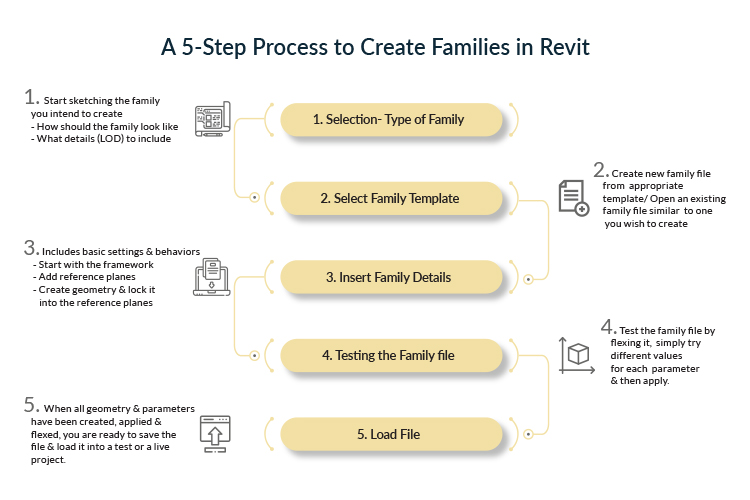
This infographic gives a simple overview of the Revit family creation process along with key considerations to keep in mind.
It highlights:
- A step-by-step process for creating Revit families
- Important design considerations before starting
- How families are structured for better usability
This is useful for:
- BIM modelers and Revit users
- Teams creating custom Revit families
- Professionals looking to improve modeling workflows
It helps you approach Revit family creation in a structured and efficient way.
Explore More BIM Resources
Frequently Asked Questions
Revit Family 201 refers to an intermediate level understanding of Revit families, focusing on how to create and manage them effectively. It builds on basic concepts and moves towards practical application.
The process typically involves defining the category, setting reference planes, adding geometry, applying parameters, and testing the family. Each step ensures the family behaves correctly in the model.
Planning helps define how the family will be used, what parameters are needed, and how it should behave. This avoids rework and improves efficiency.
Parameters control the size, behavior, and properties of a family. They allow users to modify elements dynamically within the model.
They allow reusable components, reduce repetitive work, and ensure consistency across the model.
Common mistakes include overcomplicating geometry, not planning parameters properly, and creating families that are difficult to reuse.
This infographic is useful for BIM modelers, designers, and anyone involved in creating or managing Revit families.
Well-created families improve model accuracy, coordination, and data consistency across the project lifecycle.
Revit Family 101 focuses on basic concepts and types, while 201 focuses on creation process and practical implementation.
An infographic simplifies the process into a visual format, making it easier to understand steps and concepts quickly.