Revit Family 101 Infographic for Types, Categories and Hierarchy
Revit families are the building blocks of any BIM model. Without a clear understanding of how they are structured, models can quickly become inconsistent and difficult to manage.
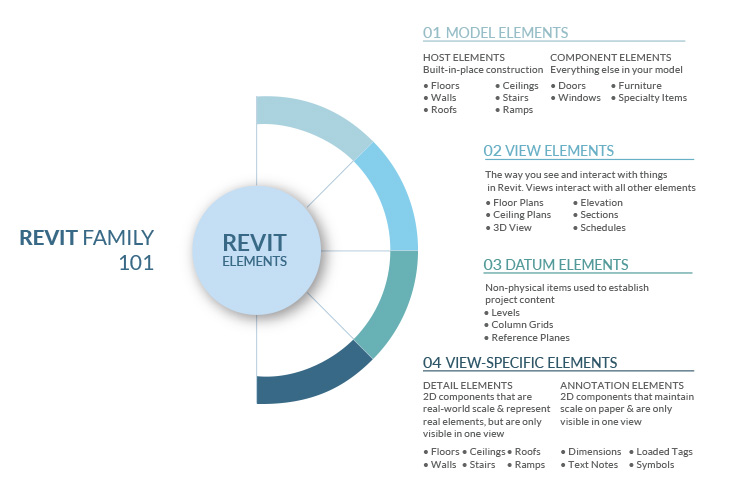
This infographic gives a simple visual overview of Revit family concepts, including types, categories, and hierarchy.
It highlights:
- Different types of Revit families
- How families are categorized in Revit
- The hierarchy that defines how elements behave in a model
This is useful for:
- BIM modelers and Revit users
- Design teams working on Revit-based projects
- Anyone looking to understand how Revit families are structured
It helps simplify core concepts so teams can build more accurate and consistent BIM models.
Explore More BIM Resources
Frequently Asked Questions
A Revit family is a group of elements that share common properties and behavior within a BIM model. It represents components such as doors, windows, equipment, and fixtures.
The main types are system families, loadable families, and in-place families. Each type is used for different modeling needs based on flexibility and control.
System families are built into Revit and cannot be created externally, while loadable families are created separately and can be reused across projects.
In-place families are custom elements created directly within a project. They are used for unique components that cannot be reused easily.
They ensure consistency, accuracy, and standardization in models. Well-structured families improve modeling efficiency and data quality.
Revit family hierarchy defines how categories, families, types, and instances are organized. It controls how elements behave and interact within the model.
They allow teams to reuse components, maintain consistency, and reduce modeling time across projects.
BIM modelers, architects, engineers, and anyone working with Revit should understand how families work.
Categories define the type of element, such as walls, doors, or mechanical equipment. They control visibility and behavior in the model.
An infographic simplifies complex concepts into a visual format, making it easier to understand relationships between types, categories, and hierarchy.