Design to Fabrication Infographic
BIM Workflow for Structural Engineers
Structural workflows often involve multiple tools and stages, and managing design updates across them can become complex.
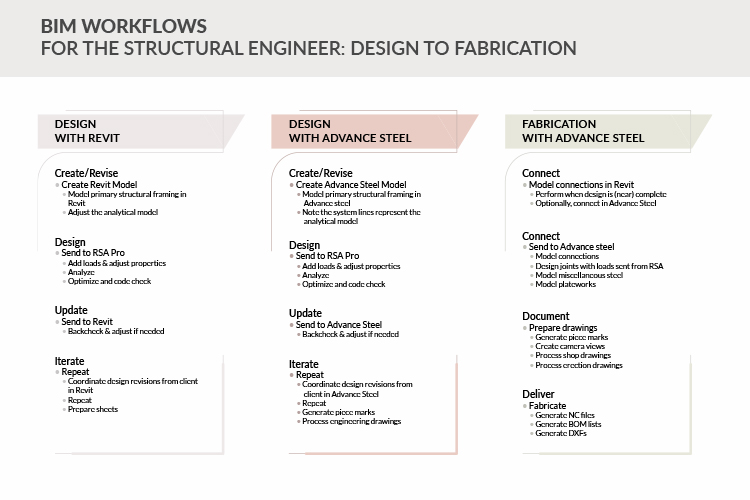
This infographic presents a clear 3-step BIM workflow for structural engineers, connecting design, modeling, and fabrication in a structured process.
It highlights:
- Design development in Revit
- Transition to structural framing in Advance Steel
- Final stage of fabrication after revisions
This is useful for:
- Structural engineers and BIM modelers
- Teams working on steel detailing and fabrication
- Professionals managing design-to-fabrication workflows
It helps teams understand how models evolve across platforms and how to manage updates efficiently throughout the process.
Explore More BIM Resources
Frequently Asked Questions
A BIM workflow for structural engineers defines how models move from design to detailing and fabrication. It ensures that data flows smoothly across different stages and tools.
The workflow typically includes design modeling, coordination and detailing, and final fabrication. Each stage builds on the previous one.
Revit is used to create and coordinate the structural design model. It helps define geometry, layout, and initial design intent.
Advance Steel is used for structural detailing and fabrication modeling. It helps convert design models into fabrication-ready components.
A structured workflow helps manage revisions, maintain model consistency, and reduce errors during design and fabrication.
Changes are updated in the model and carried forward through each stage. This ensures that all teams work with the latest information.
Structural engineers, BIM modelers, and teams involved in steel detailing and fabrication can benefit from this infographic.
BIM improves accuracy, reduces rework, and ensures that fabrication models are aligned with design intent.
Common challenges include managing revisions, maintaining consistency between tools, and ensuring accurate data transfer.
An infographic simplifies complex workflows into a clear visual format, making it easier to understand and apply.