Last updated on: October 28, 2026
By Akash Patel, Coordination Manager / VDC Manager, United-BIM. 10+ years in AEC, leading MEP-FP coordination.
Free libraries have made BIM families easy to find. Search for almost any chair, valve or light fixture and you will get a dozen downloadable files in seconds. For early design, that is often all you need.
The trouble starts later. A free Revit BIM family that looked fine in a concept model can slow down a project file, schedule with blank data, or show a product nobody actually specified. At that point, the download that saved an hour can cost days.
This guide is for architects, engineers, contractors and building product manufacturers deciding between free downloads and custom Revit families. It covers when free families are the better choice, where they fall short, and how to tell which one your project needs. It draws on United-BIM’s Revit family work, including families built to hotel brand standards for Marriott, IHG and Hilton projects.
Free vs Custom Revit Families: The Quick Answer
Use free Revit families for concept design, placeholders and generic items where exact product data does not matter. Use custom Revit families when the project needs a specific product, brand standards, reliable parameters for schedules, fabrication-level detail, or data for facility management. Manufacturers need custom families to get their actual products specified.
When Free Revit Families Are Actually the Better Choice
Custom is not automatically better. Free families come in two main kinds: the standard families that ship with Revit’s default library, and generic or manufacturer families downloaded from online libraries. Used at the right stage, both save real time.
A custom family is usually unnecessary when:
- The object is temporary, such as a placeholder at concept stage until a product is selected
- Exact product identity does not matter, such as generic office chairs in a space plan
- The family is used once, on a single project
- No schedules or downstream decisions depend on it, such as procurement, fabrication or facility management
In these cases, a clean family from Revit’s standard library or a reputable online library is the right call. Some libraries also host families published by the manufacturers themselves, which can be a good starting point as long as you check them before use.
The question is not whether free families are good or bad. It is whether a family can do the job the model needs at the stage you are in. Spend on custom families only where the model’s output depends on them.
6 Ways Free Revit Families Fall Short
These are the most common problems with downloaded families, and the reasons teams end up rebuilding them.
1. Heavy Geometry That Slows the Model
Many free families are built from imported CAD or overly detailed geometry. One heavy family is a nuisance; a few hundred instances of it is a slow model. Autodesk’s own support guidance points to loaded families as one of the first places to look when a Revit file grows too large. AUGI’s Revit performance best practices also name imported DWGs as a leading cause of bloated files, and warn that overly detailed families hurt display performance.
2. Generic Geometry, Not the Real Product
A free “lounge chair” is a lounge chair, not the one in your specification. When the design calls for a specific manufacturer’s product, a generic family can show the wrong size, shape or clearances. That matters most for equipment with service access, mounting conditions or connection points.
3. Missing or Inconsistent Parameters
Schedules are only as good as the data inside each family. Free families often have blank fields, parameter names that do not match your template, or no classification codes at all. The result is a schedule that has to be fixed by hand.
4. Families That Do Not Flex
A parametric family should change size correctly when you change its dimensions or type. Poorly built families break, distort or throw warnings when flexed. Some come with only one fixed size, so every variation needs a new download.
5. Wrong Level of Detail for the Stage
A concept-level family cannot support shop drawings, and a fabrication-level family is overkill in early design. Free downloads rarely state their LOD, so teams find the mismatch only when the model is used for something new.
6. No Standards, No Version Control
Families from different libraries follow different naming, subcategories and materials. Mixing them in one project creates visibility problems and inconsistent drawings. There is also no guarantee a family was built or tested in the Revit version your project uses.
Free vs Custom Revit Families: Side-by-Side Comparison
| Factor | Free Revit families | Custom Revit families |
|---|---|---|
| Cost | No upfront cost | Paid per family or per library |
| Product accuracy | Generic or approximate | Built from the actual cut sheet or drawings |
| File size | Varies; often heavy | Built lean for the project |
| Parameters | Often incomplete or inconsistent | Matched to your template and schedules |
| Classification data | Often missing | MasterFormat, OmniClass, UniFormat as needed |
| Flexing and types | Varies; often limited | Tested to flex; type catalogs for many variants |
| Level of Development | Rarely stated | Defined per project, LOD 100 to 500 |
| Standards | Mixed across libraries | Consistent with your firm or brand standards |
| Best for | Concept design, placeholders, generic items | Specified products, brand standards, schedules, fabrication, FM |
When You Need Custom Revit Families
The tipping point is different for project teams and for manufacturers.
For Architects, Engineers and Contractors
A download stops being enough when:
- The project follows brand or owner standards. Hotel, retail and restaurant brands publish their own FF&E and fixture standards. Those exact items are rarely in free libraries.
- Schedules drive procurement. If door, fixture or equipment schedules feed pricing and ordering, every family needs consistent, filled-in parameters.
- The model supports fabrication or shop drawings. Fabrication needs accurate geometry, connections and clearances, often at LOD 400.
- The owner wants the model for operations. Facility managers need asset data in each family, which is part of LOD 500 modeling for facility management.
- Your firm wants one consistent library. A standard office library saves time on every future project.
For Building Product Manufacturers
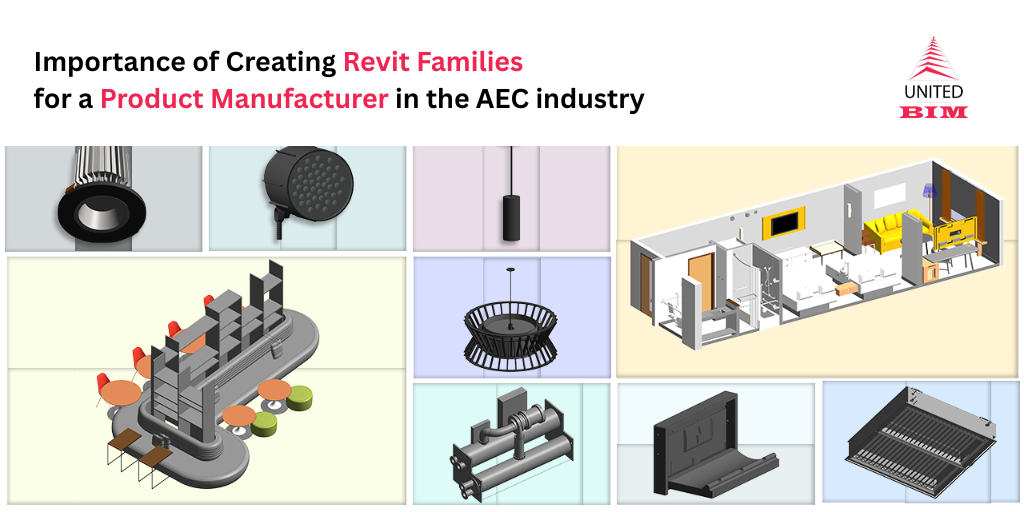
For manufacturers, the question is simple: if designers cannot find your product as a reliable Revit BIM family, they place a generic one, or a competitor’s. Manufacturer-specific families help products get specified in BIM-driven projects.
A good manufacturer family:
- Matches the real product's dimensions, configurations and options
- Carries specification data such as model numbers, finishes and certifications
- Stays light enough that designers will actually use it
- Covers product variants through types or a type catalog, rather than dozens of separate files
United-BIM builds families for building and construction product manufacturers, equipment and product manufacturers, and furniture manufacturers and designers.
From Our Projects: Custom Revit Families for Hotel Brand FF&E
Hotel projects show clearly why a download is often not enough.
An integrated AEC firm in Hartford, Connecticut needed lightweight, parametric Revit families at LOD 400 for hotel brand projects: Marriott’s Fairfield Inn & Suites, IHG’s Holiday Inn, and Hilton’s Tru by Hilton. Each brand has its own FF&E specification manual, and the families had to match it, not approximate it.
Our team built the families directly from the brands’ FF&E spec manuals, across six CSI MasterFormat divisions:
| Division | Example families |
|---|---|
| 10 Specialties | Signage, glass writing panel |
| 11 Equipment | Fitness equipment, microwave, refrigerator |
| 12 Furnishings | Nightstand, bed base, sofa, lounge chair, millwork wall, buffet counter |
| 22 Plumbing | Guest bath vanity |
| 26 Electrical | Ceiling fixtures, chandelier, wall sconces, vanity light |
| 27 Communications | TV wall mounting bracket, LED TV |
None of these brand-specific items would come from a free library in the exact form the brand requires. The full scope and project details are in our FF&E Revit family case study for Marriott, IHG and Hilton projects.
How to Check a Free Revit Family Before You Use It
Before loading a downloaded family into a live project, run these quick checks. If it fails more than one or two, a custom family will likely cost less than fixing it.
- File size. Is it heavy for what it represents? Open it and look for imported CAD.
- Flexing. Change each dimension and type. Does it resize cleanly without warnings?
- Parameters. Are the fields your schedules need present and filled in?
- Classification. Does it carry the codes your project uses, such as OmniClass or MasterFormat?
- Product match. Does the geometry match the specified product’s cut sheet?
- Visibility. Does it display correctly at different detail levels and in plan, section and 3D?
- Revit version. Was it built in, or tested for, your project’s Revit version?
- Source. Is it published by the manufacturer, or uploaded by an unknown user?
For a fuller version, download United-BIM’s free Revit family development checklist, the same quality-control list our team uses.
Repair or Rebuild a Flawed Revit Family?
A family that fails the checks above is not always a lost cause. A simple rule helps: if the problem is data, repair it. If the problem is geometry, rebuild it.
Repair the family when:
- Parameters are missing, misnamed or do not match your template
- Classification codes such as OmniClass or MasterFormat are missing
- Subcategories, materials or visibility settings are wrong
- It needs a few more types or sizes
Rebuild the family when:
- The geometry is imported or exploded CAD
- It does not flex correctly because constraints are broken
- The geometry does not match the specified product
- It is too heavy for the number of instances the project needs
Repairs are usually quick. Rebuilding a family with bad geometry from scratch is often faster than patching it, and gives you a clean family you can reuse.
BIM families, called families in Revit, are the components placed in a model: doors, furniture, equipment, fixtures and more. Each family holds geometry plus parameters and data that control how it looks, behaves and schedules. For a visual overview, see our Revit Family 101 infographic.
Often, yes, for concept design and generic items. Check file size, flexing, parameters and source before loading them into a live project, because a poorly built family can slow the model and break schedules.
When the project depends on a specific product, brand standards, accurate schedules, fabrication-level detail or facility management data. These are the uses free families most often fail to support.
It depends on the product's complexity, the number of types, the LOD and how many families you need. A simple fixed-size item costs far less than a highly configurable product with many variants. The most reliable figure is a quote based on your cut sheets.
Usually a product cut sheet or specification sheet is enough. 2D CAD drawings, sketches or existing 3D files from tools such as SolidWorks or SketchUp also work, along with the target LOD and Revit version.
Sometimes. Missing parameters can often be added. But if the geometry is imported CAD or the family does not flex correctly, rebuilding it cleanly is usually faster than repairing it.
Get a Quote for Custom Revit Families
If a downloaded family is slowing your model, missing data or showing the wrong product, it may be time for a custom build. United-BIM’s Revit family creation services cover architectural, structural, MEP, furniture and equipment families at LOD 100 to 500, built lean and tested before delivery. Send us your cut sheets or drawings and request a quote for your families.
Request a quoteAbout the Author

Coordination Manager / VDC Manager at United BIM
With over 10 years of experience in the AEC industry, Akash Patel is a seasoned Coordination Manager and VDC Manager at United BIM. His expertise lies in managing complex MEP-FP coordination projects and leveraging cutting-edge BIM technology to ensure seamless collaboration and precision. Akash is dedicated to delivering high-quality, detailed models that meet the demands of modern construction. He is passionate about optimizing workflows and driving innovation within the BIM field.